How to make an AI video tutorial
Ever had to re-record a tutorial just because one tiny step changed? That frustration is exactly why AI video tutorials are becoming so popular. An AI video tutorial is a step-by-step instructional video created using artificial intelligence instead of a camera or screen recorder. You write the content, and AI helps turn it into visuals, narration, avatars, or animated scenes.
One thing you notice quickly when learning how to make an AI video tutorial is how easy it is to adjust and update. You can update a step, fix the wording, or change the visuals without re-recording the entire video. That makes AI tutorials a practical option for creating clear instructions that stay up to date as your process changes.
What is an AI video tutorial?
An AI video tutorial is an instructional video created with the help of artificial intelligence. You start by writing out the steps you want to explain, and AI turns that content into visuals such as animated scenes, on-screen text, avatars, or voice narration.
AI video tutorials work differently from traditional video tutorials. Each part of the video (script, visuals, and narration) can be edited on its own. This means you can update a step, fix the wording, or change a visual without touching the rest of the video. For beginners, this makes the process easier to manage and less time-consuming.
When should you use AI to create video tutorials?
AI video tutorials work best when you need to explain something (like a process) clearly and more than once. If you’re creating training videos for a team, onboarding new users, or walking people through a process step by step, AI helps you keep everything consistent from one video to the next.
They’re also a good choice when your content changes often. Product updates, internal tools, or workflows rarely stay the same for long. With AI video tutorials, you can update a single step or line of text without starting from scratch. This way, your tutorials remain accurate, up to date, and easy to follow, even as things evolve.
How to make an AI video tutorial
Creating an AI video tutorial starts long before you generate the video itself. The quality of the result depends on how clearly the content is planned, written, and reviewed at each stage. By breaking the process into a few clear steps, you make sure the tutorial stays focused, easy to follow, and simple to update later.
Plan the tutorial content
Start by deciding what the tutorial needs to teach. Focus on one clear goal, such as showing how to complete a task or explaining a single feature. Once the goal is clear, list the steps in the order a viewer should follow them. Keeping the scope tight helps the video stay short and easy to understand, especially for first-time viewers.
Make a clear tutorial script or plan
A good script is the backbone of an AI video tutorial. Write in short, clear sentences and explain one step at a time. Avoid extra details that don’t help the viewer complete the task. This kind of structure works well with AI narration and avatars, since the message stays easy to follow and sounds natural when read aloud.
Choose an AI video creation tool
When choosing a tool for your tutorial, focus on how clearly it can present information. Some tutorials benefit from having a visual guide on screen, such as an avatar that explains steps or points out key actions.
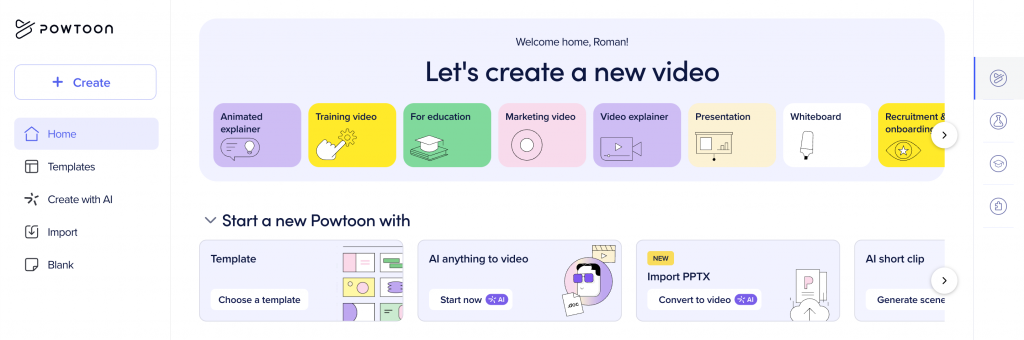
Tools like Powtoon’s AI avatar generator make it easier to guide viewers through instructions without needing to appear on camera yourself. It also helps to look for flexible layouts, simple animations, and built-in voice narration. Powtoon lets you choose an avatar template and combine text, visuals, and narration in one place, which keeps the process straightforward. The goal is to turn your script into a clear visual flow without adding technical complexity.
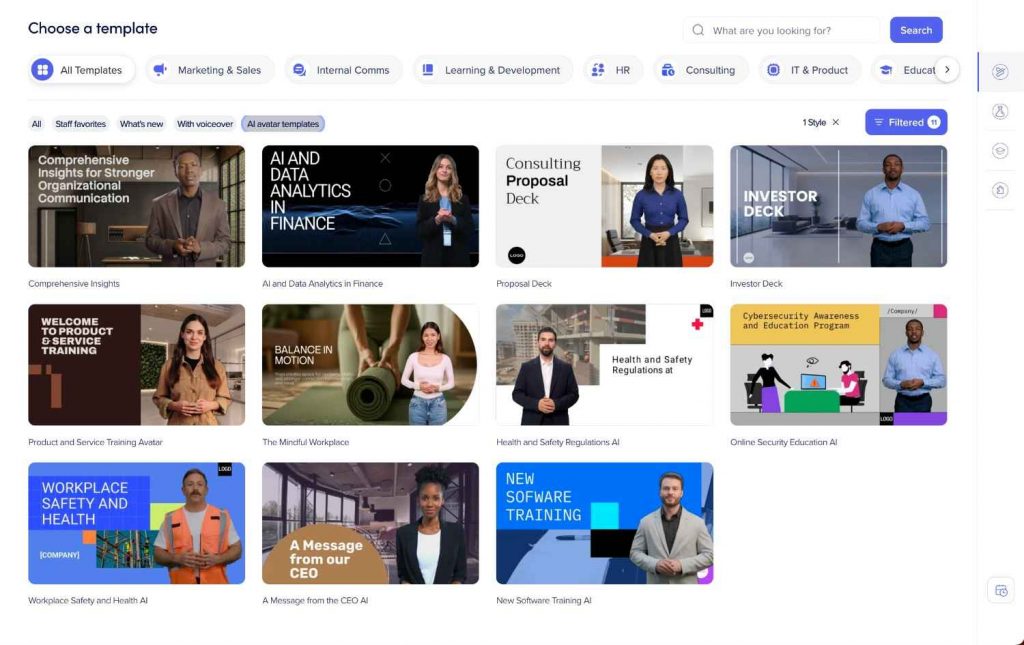
You can also skip choosing a template altogether and prompt the AI anything-to-video tool directly. Give it a prompt, document, or file, and it generates the script and video for you.
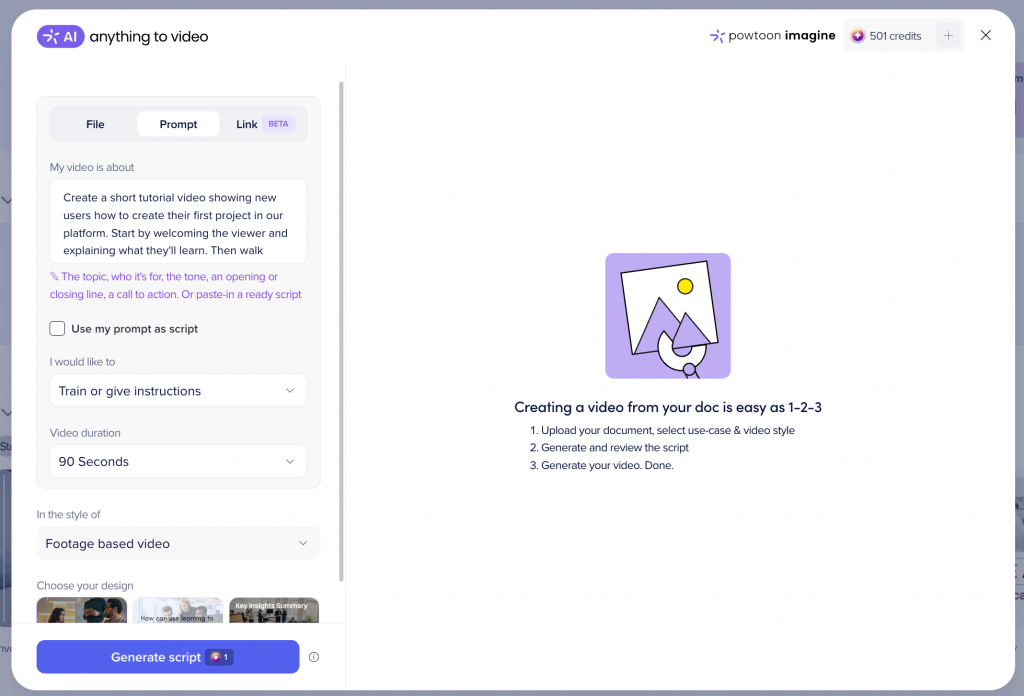
Generate and edit
Once your script and visuals are ready, the tool generates the first version of the tutorial. This is where the AI video generator takes your written steps and turns them into a structured video with scenes, narration, and on-screen elements.
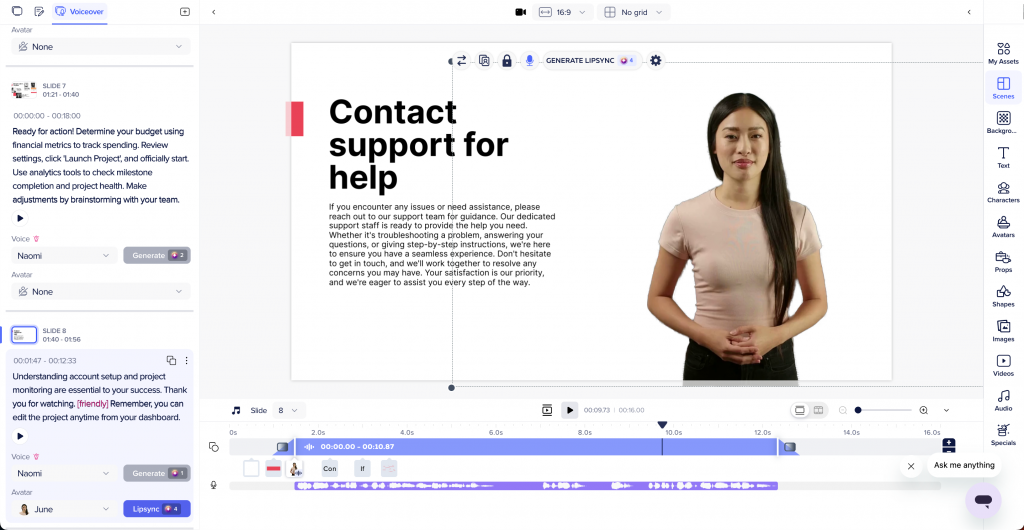
After the initial version is created, take time to review and refine it. Make sure each step appears long enough to be understood, visuals match what’s being explained, and the narration sounds clear and steady. With tools like Powtoon, you can easily adjust scenes, text timing, and pacing so the tutorial flows naturally from start to finish.
Export and update the tutorial
After editing, export the video in a format that fits where it will be shared, such as internal platforms, websites, or training libraries.
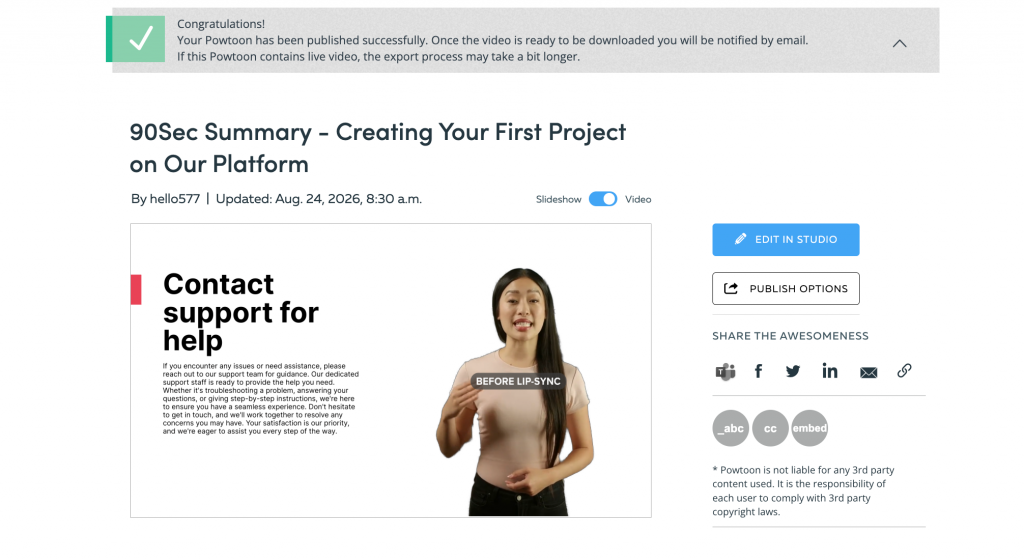
One of the biggest advantages of AI video tutorials is how easy they are to update later. If a step changes, you can edit the script or visuals and re-export the video without rebuilding it from scratch. Powtoon supports multiple export options, which makes it simple to reuse the same tutorial across different channels as your content evolves.
Common mistakes when creating AI video tutorials
AI tools can speed up tutorial creation, but clear instructions still depend on how the content is planned and reviewed. Most issues come from common mistakes that make tutorials harder to follow. Below are the ones to watch out for.
Trying to cover too much in one video
Packing multiple topics or workflows into a single tutorial can confuse viewers. AI video tutorials work best when each video focuses on one clear task and walks through it step by step.
Writing unclear or incomplete scripts
AI follows the script closely. If instructions are vague, rushed, or skip steps, the final video will feel confusing. Clear, simple language and a logical step order make a big difference.
Relying on AI output without reviewing it
The first version of an AI-generated video is a starting point, not the final result. Skipping the review step can lead to awkward pacing or unclear explanations. A quick edit helps smooth the flow and improves understanding.
Ignoring the viewer’s learning pace
Moving too quickly through steps can overwhelm beginners. Each instruction needs enough time on screen for viewers to process what they’re seeing and hearing.
When AI video tutorials work best
AI video tutorials work best when you need to explain something clearly and do it more than once. They’re a good fit for training, onboarding, and product walkthroughs, where people expect straightforward guidance they can follow at their own pace.
They’re also useful when instructions change from time to time. Instead of redoing the whole video, you can update a step and move on. That makes AI video tutorials a practical choice for teams and creators who want instructions to feel simple, flexible, and easy to keep up with.
FAQs
How long does it take to make an AI video tutorial?
The time depends on how clear the content is from the start. If the steps are already planned, learning how to create an AI video tutorial can take less than an hour. Most of the time is spent reviewing and making small edits to improve clarity.
Do AI video tutorials replace screen recordings completely?
AI video tutorials don’t fully replace screen recordings in every case. Screen recordings are still useful for showing live actions or detailed clicks. AI tutorials work better when the goal is to explain a process in a clear, structured way.
What types of tutorials work best with AI video creation?
AI is well-suited for training, onboarding, and step-by-step guides. These formats are easier to update and keep consistent, which is often the reason people look into how to create an AI-generated video tutorial. They work especially well when instructions need to stay clear over time.
Do AI-generated video tutorials need manual editing?
Yes, a short review and some light editing are usually helpful. AI can build the structure of the video, but checking the timing, wording, and step order ensures everything is clear. A few small adjustments can make the tutorial feel more natural and easier for viewers to follow.

Ilya Spitalnik
Latest posts by Ilya Spitalnik (see all)
- AI avatars in branding: How to create branded video ads that stand out - September 3, 2026
- How to make an AI video tutorial - September 3, 2026
- Powtoon’s Unified AI Video Platform: A New Era for Enterprise Visual Communication - December 17, 2025
- How AI Bridges Theory to Practice in Learning, Development and Communications - October 23, 2025